
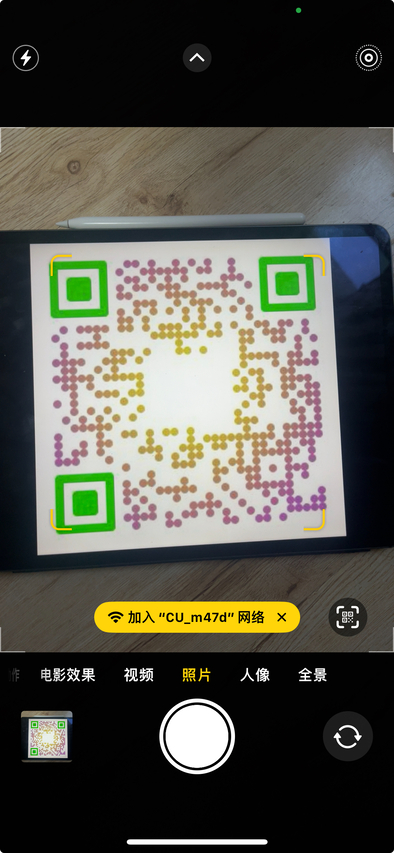
Your home Wi-Fi can be turned into a QR code, so anyone can point a phone camera at it and join automatically (see below). No more reading the password out letter by letter when friends come round. Just tell our Mini Program: “Make me a Wi-Fi QR code — my network is CU_m47d, the password is m47dng1h, and I would like it in pink.” Bing!~ The QR code appears in the file panel at the top, and the arrow on the right shares it with whoever you like. (Note: camera-based QR scanning is currently supported on iPhone only.)
Images inside a PDF come out in seconds. If there is a picture in a PDF you want, upload the file with the “+” button to the right of the chat window; once its name shows up in the file panel at the top (say, invoice.pdf), the upload has gone through. Then type in the chat: “Pull the images out of invoice.pdf.” A moment later the extracted images appear in the file panel. You can also convert the PDF pages themselves straight into images.
The Mini Program will also read text aloud. Say there is a poem you love and you are curious how it sounds in your home dialect — just ask: “Read ‘The Crane Cries’ in the Henan dialect: ‘The crane cries in the deep marsh, and its voice is heard in the wilds. The fish lies hidden in the depths, or rests upon the islet…’” A moment later the audio file appears in the file panel (MP3 by default). WeChat Mini Program rules mean it cannot be played inside the Mini Program itself, but you can share it to File Transfer and play it there.
We can download videos for you as well. If you have a link — say something on Bilibili, https://www.bilibili.com/video/BV1yx4y1Y7HP/?share_source=copy_web — you can simply say: “Please download this video: https://www.bilibili.com/video/BV1yx4y1Y7HP/?share_source=copy_web” and ask for HD. A moment later the video file shows up in the file panel. Do not need HD? Then say: “Download https://www.bilibili.com/video/BV1yx4y1Y7HP/?share_source=copy_web — I do not mind the resolution, but keep the file small.”