



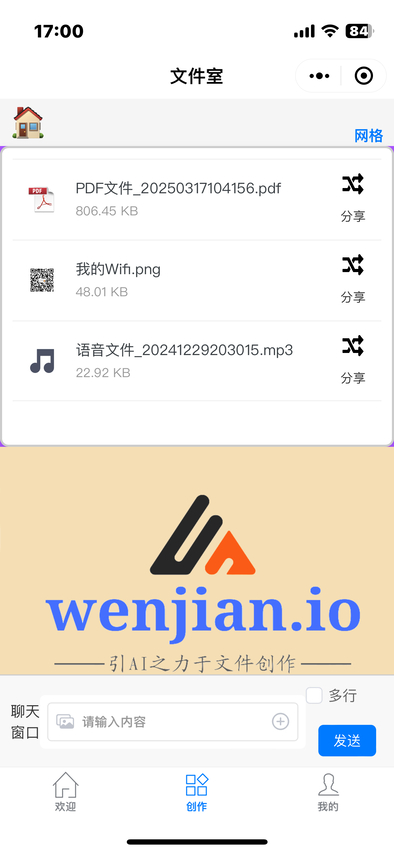
How It Works on Your Phone
File IO Official Account Mini Program
Everything starts from our WeChat Official Account “File IO”. Open its menu, choose “Try it out” and the demo opens straight away. Its screen is shown on the left. From there you can:
- Import a PDF from a WeChat chat and pull the images out of it
- Combine several images into a single PDF
- Turn text into speech
- Download the video behind any link you give us
- Share the files created here with your WeChat contacts, or save them to your device
- Describe what you need in plain language — we answer with a file

How It Works on a PC
Four steps to start creating with files Connect to the server Create an empty file Describe what you need Rename it (F2)
The idea is simple: create an empty file, write what you want inside it in plain language, then close it. Renaming the file is how you tell us you have finished writing — that is the moment we start acting on your instructions.
Connect to the server
Every mainstream operating system is supported — Windows, macOS and Linux. On mobile, both iPhone and Android work, and so do some tablet models.
Describe what you need
Describe what you want in one short sentence. For example: pull every page of this PDF out as an image.
Rename it
Once you have written your description, renaming the file is what triggers it. The name must start with the four characters "-ai." followed by anything you like — for example “-ai.01.txt”.
How to Top Up
Our plans come as Monthly Quarterly Half-yearly YearlyToken top-up
You top up from the WeChat Official Account “File IO” — tap the “Top up” menu to open the payment page. You can also type “top up, monthly” into the Mini Program chat window to generate a payment QR code, though you will need a second phone to scan it and finish paying.